Supatype
Simple, affordable, yet powerful voice dictation and transcription application for Windows.
Beta now available to download
Join the beta and help shape the future of Supatype. The first 100 users will receive a special “Founders” badge and exclusive early pricing.
Sign in to receive updates about Supatype development.
Features
Affordable Pricing
Committed to offer a simple, transparent pricing with special rates when Supatype is out of beta
Lightweight & Fast
Minimalistic design that doesn't consume much computer resources
Windows Only
Currently available for Windows only
Works Everywhere
Functions in every Windows app, including the terminal
Multiple Languages
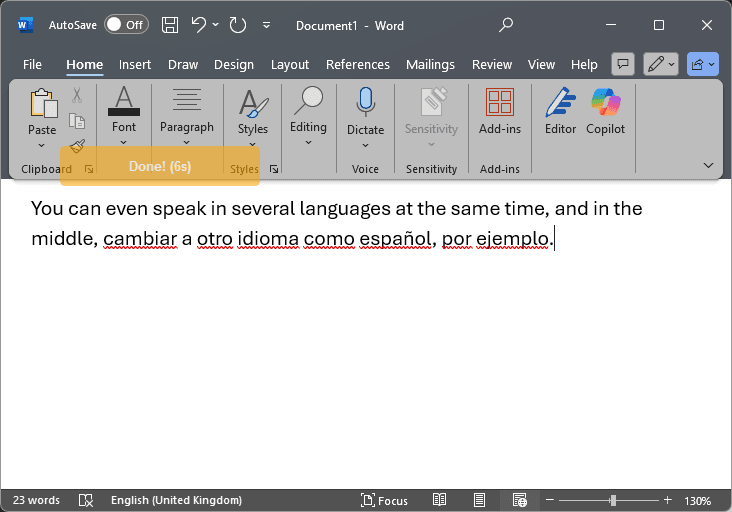
Supports speaking in multiple languages simultaneously
Privacy
Recordings are not stored anywhere and no data is used to train the models
Download
Supatype is currently on beta: Please report any problems you experience or feature you would like to see implemented.
Supatype v0.1.0-beta.1
Beta 1 • 13/10/2025 • Windows 10/11 only.
File size: ~60MB • SHA256
Malware Analysis
Known Issues & Limitations
Authentication Issues
Authentication sessions may expire after a few hours or days. You may need to sign in again to continue using the application.
Recording Limitations
- • Maximum recording duration: 1 minute
- • Cooldown period between recordings: 10 seconds
- • Rate limits may be applied during Beta
SmartScreen / Antivirus Warnings
Because the installer isn't code-signed yet and Supatype is a new app, Windows SmartScreen or some antivirus tools may warn or block it by default. The file is safe. You can verify the download by checking the displayed SHA256 hash in the Download section and reviewing independent scans: Kaspersky and VirusTotal. We're working on obtaining a code-signing certificate for future releases.
FAQ
Why did you create it when there are other solutions?
I was not satisfied with existing solutions, specifically with the expensive pricing, so I decided to create my own. This is now my daily driver and I will continue maintaining it and adding features that I find useful for my workflow. Hopefully others will find it useful too!
What languages are supported?
Multiple languages are supported, and you can even switch between different languages within the same recording. The application automatically detects and transcribes the language being spoken.
Does it work in all Windows applications?
Yes, it is designed to work in every Windows application. Unlike similar apps that use copy-paste, Supatype simulates typing for maximum compatibility with applications like the Terminal. I plan to provide a user-selectable option to change this behavior in future versions.
How is my privacy protected?
Voice recordings are never stored - they exist only in memory before being sent to the API, then immediately discarded. Only privacy-respecting models that do not train on user data are used. Supatype doesn't use “Free” models since they typically use submitted content for training purposes.
What are the system requirements?
It works on Windows 10 and Windows 11, requires minimal system resources. You only need a microphone and an internet connection to send the recordings to the backend service.
When will it be available for Mac or Linux?
If the project is successful, I will consider porting the application to Linux and Mac (in that order).
How accurate is the voice recognition?
Test it for yourself and decide! After using Aqua Voice for months, I find Supatype more accurate and cost-effective for daily use.
Can I use it offline?
No, it currently relies on a backend service to handle all processing logic. However, I would like to implement local models in the future.
Will it really be free during beta?
Yes, it is completely free during beta development. If people like it, I will consider an affordable pricing plan so everyone can continue using it while supporting continued development and maintenance.
Can I test it from the browser?
Not yet, but this is already being considered for future development.